Test as you type
Code Coverage
NCrunch tracks your code coverage in real-time, showing this in markers next to your code.
This makes it easy to track where your coverage is heavy or light.

Performance Metrics
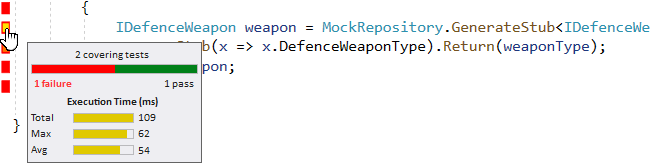
NCrunch passively collects performance data from your tests while they run.
This is tracked and displayed on a per-line basis using yellow 'hot spots' on coverage markers.
Control and Data Inspection
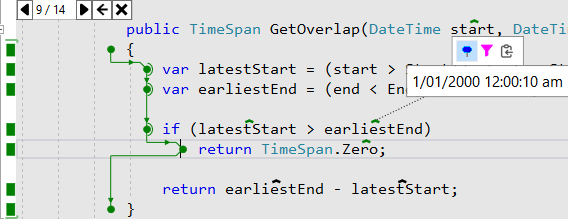
NCrunch's Runtime Data Inspection collects and reports
variables, fields, parameters, method return results and control flow as it happened during your test run.
You can drill into and slice this up on demand from right within your code. Find the bugs with no debugger necessary!

Built for heavy lifting
NCrunch was designed with big complex projects in mind. We've spent the last 16 years optimising and scaling the NCrunch system to meet the needs of real-world systems consisting of millions of lines of code and many thousands of tests.

Smart Test Execution
NCrunch tracks all sorts of test related data, and it uses it to give you the most important feedback as fast as possible.
Tests that you have recently impacted with your code changes are prioritised for execution using sophisticated and high performance IL-based change mapping.

Distributed Processing
NCrunch can offload build and test work to other computers for processing. Farm tasks out to connected machines or scale into the cloud.
Processing resources can be shared between developers allowing teams to pool their testing resources.

Small Footprint
NCrunch is extremely configurable. Fine-tune NCrunch's CPU and memory consumption to best fit your specific needs.
Where your tests support it, NCrunch can be configured to run them in parallel across separate processes, dramatically reducing your end-to-end test times.
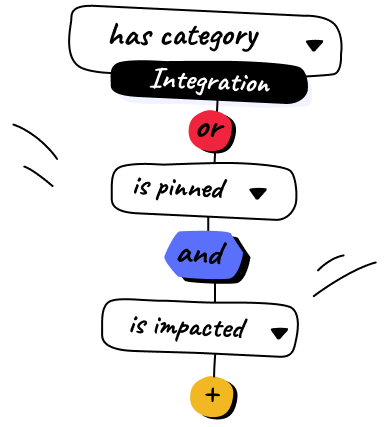
NCrunch lets you create very configurable filters to choose which tests you want to run automatically, letting you use it as a manual or partially continuous test runner.
In constrained environments it is even possible to configure the engine to run only impacted tests, greatly reducing resource consumption.
A proven solution
Mature Product
NCrunch has been in development since 2009, and we still regularly release updates with new features and improvements.
We've spent countless hours adapting the product to handle the scale and complexity of real world software projects.
Widely Used
NCrunch is used every day by tens of thousands of developers all around the world.
Many of the world's most proficient .NET developers trust NCrunch to deliver their test results with speed and consistency.
Experienced Team
Our development team has decades of experience in developing software solutions and deep knowledge of the .NET platform.
We have a broad history of consulting across many different industries. We leverage this experience to build the best testing tool available for .NET.
"NCrunch makes the TDD cycle a joy"
Author, Art of Unit Testing