
NCrunch is the ultimate live testing tool for .NET.
Automatic Concurrent Testing
Code Coverage
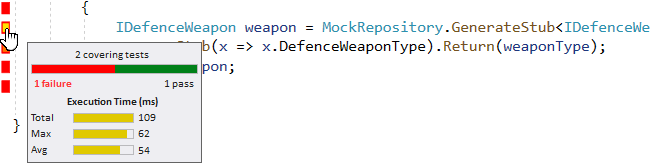
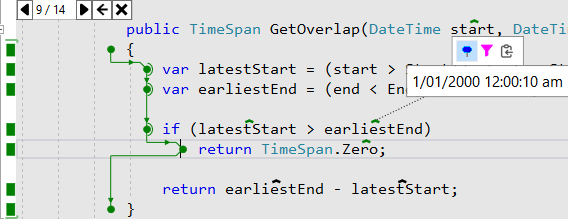
This is shown next to your code in coloured markers showing which lines the tests touched, with marker colours indicating pass or fail status.
You can also navigate to any covering tests from any line of code, making it easy to see which tests you might impact with a change.
Full code coverage metrics are also available for your entire solution, allowing you to see where your code coverage is heavy and where it's light.
Performance Metrics
Metrics are shown inline conveniently with a tooltip, and 'hot spots' are shown with special colouring on the code coverage markers.
Inline Exception Details
This makes it really easy to spot where your tests went wrong, without the information getting in your way.
No matter where you are in your source code, you'll be able to analyse problems quickly and without fuss.
Intelligent Test Execution
Tests that you have recently impacted with your code changes are prioritised for execution using sophisticated and high performance IL-based change mapping.
NCrunch uses a powerful weighting system designed to give you the most important feedback as fast as possible.
Distributed Processing
Tasks are cleanly farmed out to any number of connected machines, forming grids to execute tests.
Grid servers can be shared between developers allowing teams to pool their resources.
Grids can even be scaled into the cloud to maximise testing throughput.
Distributed processing with NCrunch is highly effective, allowing concurrent execution of dozens or possibly even hundreds of tests at any one time.
show more features
Small Memory Footprint
It has been fully tested and designed to work well on solutions with potentially millions of lines of code and many thousands of tests.
An extensive range of simple configuration options allow you to tune NCrunch's CPU and memory consumption to best fit your specific needs.
Parallel Execution
This can cut your end-to-end test times down by a huge factor over any normal synchronous test runners.
Tests will never be run in parallel within the same process, so there's no thread safety risks or problems with singletons.
Optimised Build Process
Smart Multiprocessor Support
This helps to ensure that the constant churning of tests won't adversely impact your coding experience in Visual Studio.
Easy Debugging
You can break into a line of code with the debugger using a single context menu command or shortcut key.
Part Continuous/Manual Mode
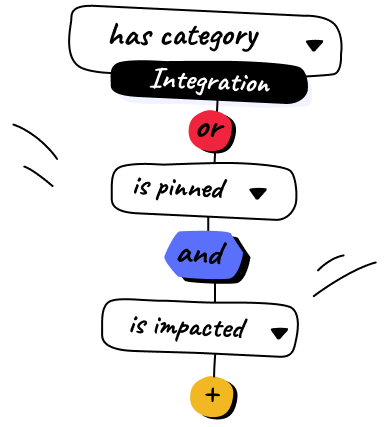
NCrunch lets you create very configurable filters to choose which tests you want to run automatically, letting you use it as a manual or partially continuous test runner.
In constrained environments it is even possible to configure the engine to run only impacted tests, greatly reducing resource consumption.
| 28 Jul 2020 | / | 4.4 Minor feature release (details) |
| 02 Feb 2020 | / | 4.3 .NET Core assembly resolution fixes. Fixes for optimised mode. Other fixes. |
| 13 Dec 2019 | / | 4.2 Fixes for V4 release. See here for more detail on V4 features |